AI form generator · works in your browser
Turn one sentence into a real Google Form.
Tell FormMaker what you need — a customer survey, an event registration, a job application — and it drafts every question, chooses the right question types and creates the form in your own Google account. You review it, change anything, and share.
How it works
From a sentence to a finished form in three steps.
The AI does the blank-page work. You stay in charge of every question, and the result is an ordinary Google Form you own.
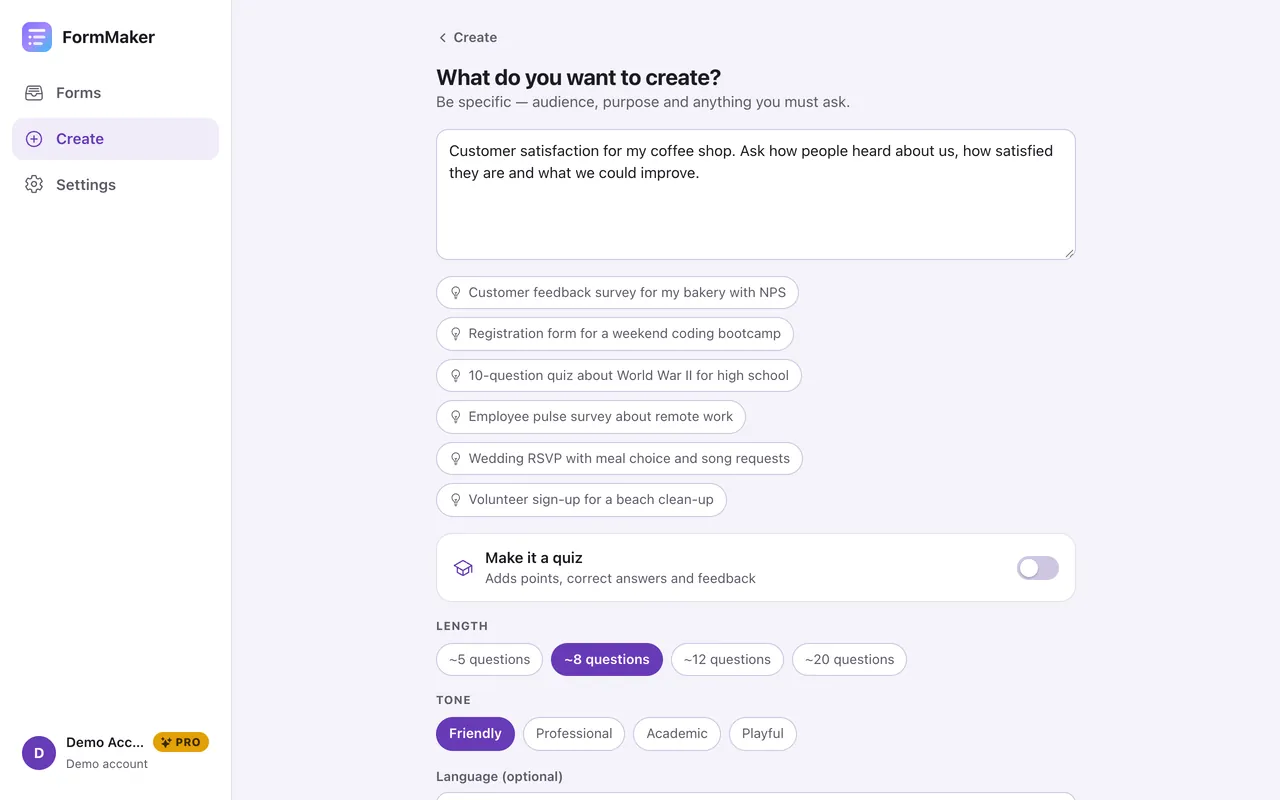
Say what the form is for
Write it the way you'd brief a colleague: the purpose, who will fill it in, and anything it must include — "ask for dietary needs", "make it a 10-question quiz".
Edit the draft
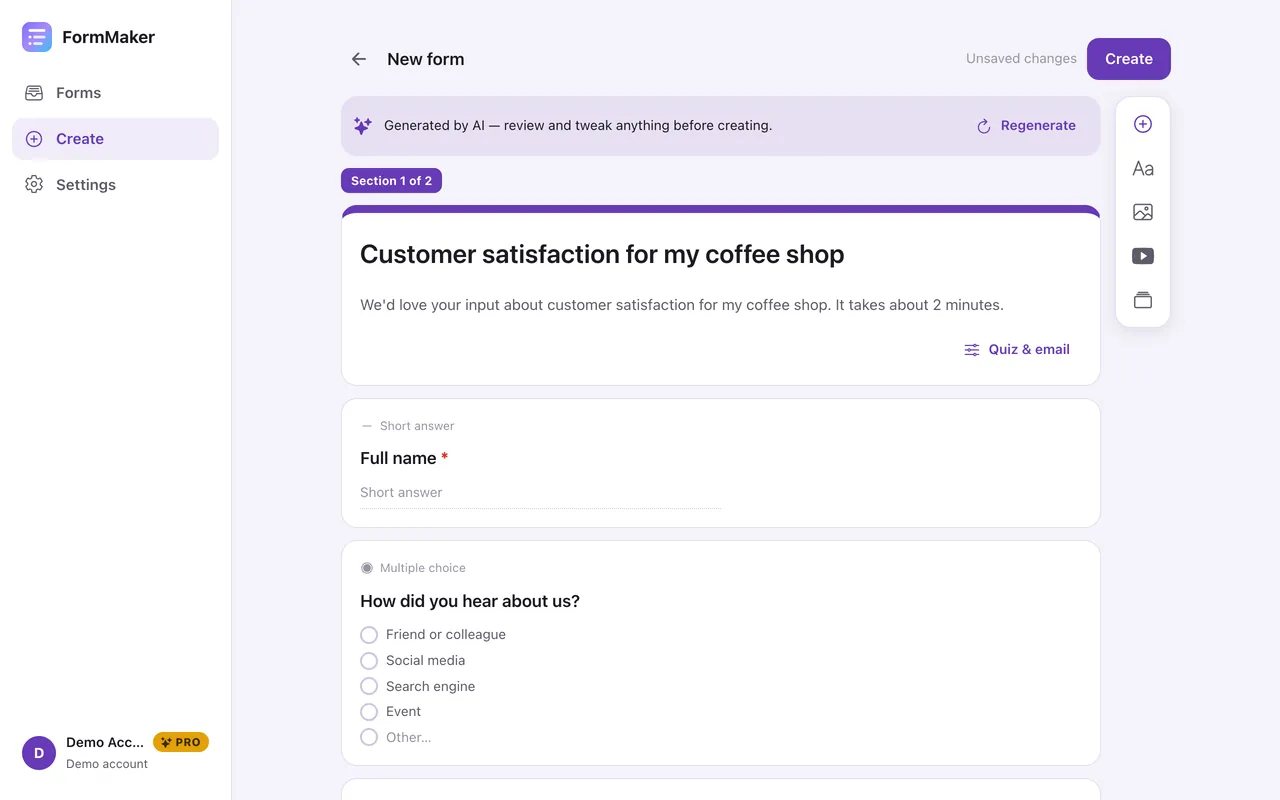
FormMaker shows the questions it wrote, with the question types it picked. Reword, reorder, delete, add a section or mark questions required.
Create the Google Form
One click creates the form in your Google account. Copy the link or the embed code and responses start arriving — in FormMaker and in Google Sheets.
What people generate
Forms people build with one sentence.
Customer feedback surveys
Rating scales, open comments and a "may we follow up?" question, worded neutrally.
Survey guide →Event registrations
Attendee details, ticket or session choice, dietary needs and a capacity note.
Registration guide →Job applications
Contact details, role, experience, availability and a link to the résumé.
Application guide →Order forms
Product choices, quantities, pickup or delivery, and contact details.
Order form guide →Quizzes with answer keys
Graded questions with correct answers and point values filled in.
AI quiz maker →Sign-up sheets
Volunteer shifts, potlucks, time slots — with clear options people can pick.
Sign-up guide →What you get
A draft you'd actually send — not a list of generic questions.
It picks the format, not just the wording.
Choices become multiple choice or checkboxes, ratings become linear scales, dates become date questions and long answers get a paragraph field — so the form works the way respondents expect.
- Multiple choice, checkboxes, dropdowns and grids
- Linear scales and star-style ratings
- Short answer, paragraph, date and time
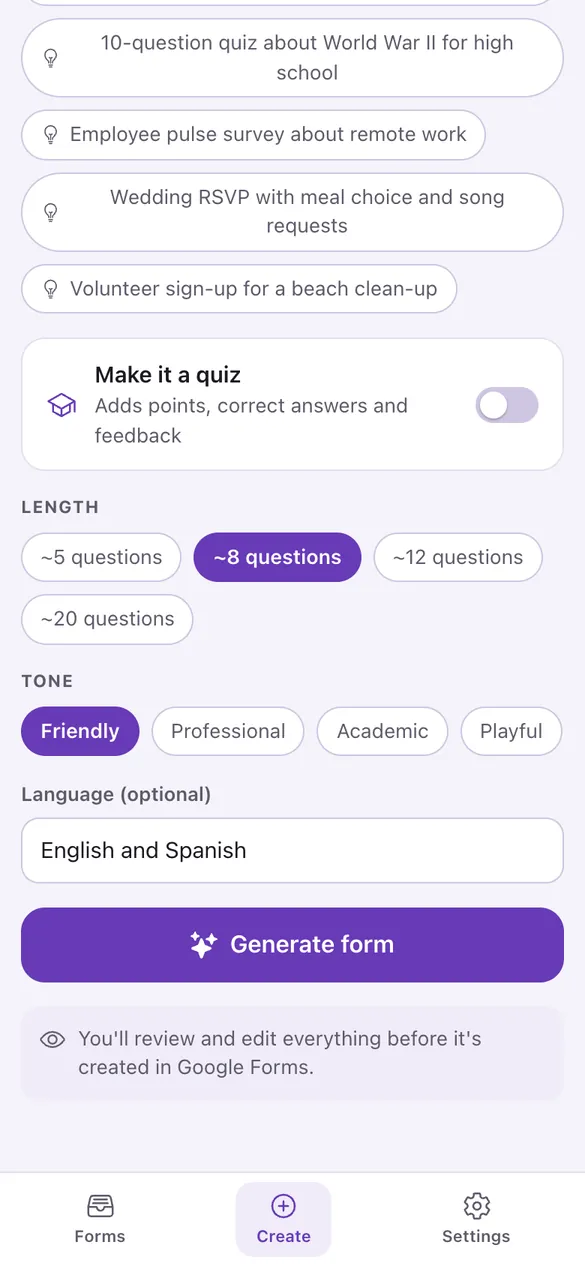
Write in English, Spanish — or ask for both.
Describe the form in the language you think in and ask for the form in the language your respondents read. Useful for bilingual classrooms, community groups and customer bases.
- Prompt and form language can differ
- Tone options from friendly to formal
- Regenerate for a different set of questions
Nothing is locked — it's a normal Google Form.
After the AI drafts it, the form behaves like any other Google Form: open it in Google Forms, add logic, change the theme, link it to a spreadsheet. FormMaker just got you there faster.
- Edit in FormMaker or in Google Forms
- Export or sync responses to Google Sheets
- Share by link, email or embed code
Compared with doing it by hand
Where the time actually goes.
| In Google Forms by hand | With FormMaker | |
|---|---|---|
| Blank page | Start from an empty form and think up every question | A complete draft from one sentence |
| Question types | Pick a type for each question by hand | Chosen for you, changeable any time |
| Quizzes | Set every correct answer and point value yourself | Answer key and points drafted with the questions |
| Wording | Easy to write leading or double-barreled questions | Neutral wording you can still adjust |
| Reading responses | Scroll through the summary or build a spreadsheet | AI summary of findings and next steps (paid plans) |
Writing a good prompt
What to put in your description.
The AI works from what you tell it, so a sentence with a little context produces a much better draft than a single word. Include four things:
- The purpose. "Feedback after a cooking class" tells the AI what decisions the answers should inform; "feedback form" does not.
- Who fills it in. Parents, customers, employees and students need different wording and a different length.
- Must-have questions. If you need an email address, a link to a résumé or a consent checkbox, say so. The AI can't create file upload questions; add those in Google Forms.
- Size and format. "About 8 questions", "a 10-question graded quiz" or "keep it under a minute" keeps the draft focused.
For example: "Sign-up form for our Saturday volunteer shifts at the community garden — name, email, phone, which shifts (8–10, 10–12, 12–2), any tools they can bring, and a liability waiver checkbox." That produces a form you can share almost as-is. If the draft misses something, edit it directly or regenerate with one more detail. Our guide on creating a Google Form with AI walks through twelve real prompts and the forms they produce.
What to check before you share
AI drafts are a starting point. Before you send the link, read every question once as a respondent would: is anything ambiguous, is any question asking two things at once, are the answer choices complete (add "Other" or "Prefer not to say" where it fits), and is anything required that shouldn't be? Check that you're not collecting personal information you don't need — our data privacy guide covers what to leave out.
Prompt examples
Example prompts by audience, and what each one should give you
The quality of an AI draft depends mostly on the brief. A good prompt names the purpose, the people who will answer, and the two or three things the form must not miss. Below are prompts written the way real users in different jobs might type them, followed by the questions a useful draft should contain. If your draft is missing something on the list, add it in the review step or regenerate with a more specific sentence.
Teacher: a back-to-school family survey
Prompt: "Beginning-of-year survey for parents of my 3rd graders: best way to contact them, languages spoken at home, anything I should know about their child, and permission for class photos."
- Student name and parent or guardian name (short answer, required)
- Preferred contact method: email, text, phone call, school app (multiple choice)
- Best email or phone number (short answer, with response validation for email format)
- Languages spoken at home (checkboxes with "Other")
- Something you'd like me to know about your child (paragraph)
- Photo permission: yes / no (multiple choice, required)
Restaurant owner: a catering inquiry form
Prompt: "Catering request form for my taqueria: event date, headcount, pickup or delivery, menu interest, dietary restrictions, and budget range."
- Name, phone, email (short answer)
- Event date (date) and serving time (time)
- Estimated headcount (short answer, number validation)
- Pickup or delivery (multiple choice); delivery address (short answer, best shown only to delivery respondents with section branching)
- Menu items of interest (checkboxes)
- Dietary restrictions (checkboxes: vegetarian, vegan, gluten-free, nut allergy, Other)
- Budget range (dropdown)
HR manager: a new-hire equipment request
Prompt: "Form for new employees to request equipment before day one: laptop preference, monitor, headset, software access, shipping address for remote hires, start date."
- Full name, work email, manager name (short answer)
- Start date (date)
- Work location: office, hybrid, remote (multiple choice)
- Laptop preference (multiple choice) and accessories (checkboxes)
- Software and systems access needed (checkboxes with "Other")
- Shipping address for remote hires (paragraph)
Nonprofit coordinator: a food drive volunteer form
Prompt: "Volunteer sign-up for our Saturday food drive with shift choice, lifting ability, age 18+ confirmation and emergency contact."
- Name, email, phone (short answer)
- Shift preference (checkboxes for each time slot)
- Comfortable lifting boxes up to a stated weight? (multiple choice)
- I confirm I am 18 or older, or attending with a parent or guardian (checkbox, required)
- Emergency contact name and phone (short answer)
Real-estate agent: a buyer intake form
Prompt: "Buyer questionnaire: price range, neighborhoods, bedrooms and bathrooms, must-haves, pre-approval status, timeline to move."
- Price range (dropdown), preferred neighborhoods or ZIP codes (short answer)
- Minimum bedrooms and bathrooms (dropdown)
- Must-haves (checkboxes: garage, yard, home office, single-story, Other)
- Mortgage pre-approval status (multiple choice)
- Timeline to move (multiple choice) and best time to reach you (checkboxes)
Event planner: a wedding guest RSVP
Prompt: "RSVP for a wedding: attending or not, number in party, meal choice per guest, song request, and whether they need a shuttle from the hotel."
- Guest name(s) (short answer) and attending yes / no (multiple choice, branching to the end if "no")
- Number in party (dropdown)
- Meal choice (multiple choice grid: one row per guest, one column per entrée)
- Need hotel shuttle? (multiple choice)
- Song request and note to the couple (short answer, paragraph)
Notice the pattern: each prompt lists the must-have topics, so the AI spends its effort choosing question types and wording rather than guessing what matters. Longer walkthroughs live in how to create a Google Form with AI.
Choosing a method
AI, a template, or building by hand: when to use which
FormMaker gives you three ways to start, and none of them is always best. The right choice depends on how standard your form is and how much of it you already know.
Use a template when the form is a familiar type
RSVPs, customer satisfaction surveys, order forms and job applications follow well-known shapes. A template gives you a tested structure instantly and does not use any of your monthly AI form allowance. Customize the wording, delete what you don't need, and publish.
Use the AI generator when the form is specific to you
If the form has unusual details (a pre-visit questionnaire for a dog groomer, a feedback form for a particular workshop, a bilingual parent survey), describing it in a sentence is faster than adapting a template that only half fits. The AI is also helpful when you know the goal but not the questions: "find out why members didn't renew" produces a sensible starting set you can then trim.
Build by hand when every word is already decided
Legal waivers, forms that must match a paper original, or a questionnaire your organization has already approved are better typed in directly. Generating them would only add a step where you correct wording that was fixed in advance. You can still build them inside FormMaker or in Google Forms directly, question by question.
Many people mix approaches: start with a template, then ask the AI to add a section, or generate a draft and then hand-edit the final questions in FormMaker or directly in Google Forms.
Limits and privacy
What AI drafts get wrong, and what happens to what you type
Known limitations of AI drafts
An AI draft is a first version written by a language model, not a reviewed document. Treat it the way you would treat a draft from a new assistant:
- It can miss your specifics. The model doesn't know your store hours, your school's photo policy or your exact shift times unless you include them. Add those details in the prompt or in review.
- It can over-ask. Drafts sometimes include questions you don't need. Shorter forms are usually easier to finish, so delete anything you won't act on.
- It doesn't set up advanced settings for you. Branching, response validation, file uploads that require sign-in, and response limits are configured in Google Forms itself. See closing a form and limiting responses for one common example.
- It isn't legal or compliance advice. Consent language, waivers and anything collecting health or financial information should be reviewed by someone responsible for that area.
- It produces text only. The generator writes questions, options and descriptions; it does not create images or header graphics.
FormMaker handles this by always putting a review step between the draft and the real form. Nothing is created in your Google account until you choose to create it, and afterward the form stays fully editable. If a draft misses the mark, regenerate with a more specific prompt rather than fixing every question by hand. Adding the audience, the number of questions you want and the tone ("friendly, under two minutes to finish") usually gets a closer second draft.
Content moderation
Every AI request passes through an automated content-moderation filter before a draft is generated. Requests for forms intended to harass, deceive or collect information for prohibited purposes are declined. The full rules are in our acceptable use policy.
Privacy of your prompt
The sentence you type is sent to our AI provider only to generate your draft. Per our AI provider's API data policy, data submitted through the API is not used to train its models. Avoid putting personal information about real people into a prompt; it is never needed to describe a form. The form itself, and the responses it collects, live in your own Google account, in Google Forms and any Google Sheet you connect. Details are in our privacy policy, and US-specific considerations are covered in Google Forms data privacy in the US.
How many AI drafts you get
The Free plan includes 5 forms. Bronze ($4.99/month) adds unlimited forms with 20 AI-generated forms and 10 AI analyses a month; Silver ($9.99/month) raises that to 100 and 50; Gold ($19.99/month) to 400 and 200 with priority support. Templates and hand-built forms don't count against AI limits. Compare plans on the pricing page.
FAQ
Common questions
Is the AI form generator free?
You can create up to 5 forms for free. AI form generation is included in the paid plans: Bronze includes 20 AI forms a month, Silver 100 and Gold 400. See the pricing page for details.
Does it create a real Google Form?
Yes. The form is created in your own Google account, with the same link, settings and Google Sheets connection as any form you build in Google Forms.
Can I edit the questions after the AI writes them?
Yes. You can reword, reorder, delete or add questions in FormMaker before and after the form is created, or open it in Google Forms and edit it there.
Can it make quizzes with answer keys?
Yes. Ask for a quiz and FormMaker drafts the questions together with the correct answers and point values, which you can review before publishing.
What happens to the text I type?
Your description is sent to our AI provider only to produce the draft and is checked by an automated content filter. Requests that break our acceptable use policy are refused.
Do I need to install anything?
No. FormMaker runs in your browser at formmaker.us/app — sign in with Google. There is also an iPhone app.
Guides
Learn more about AI and Google Forms.
How to create a Google Form with AI
Twelve real prompts and the forms they produce.
AIGoogle Forms AI question generator
How AI question drafting works and its limits.
BasicsHow to make a Google Form
Every question type and setting, step by step.
Question typesEvery Google Forms question type
When to use each one.
ResponsesGoogle Forms response analysis
From raw answers to decisions.
TemplatesGoogle Forms templates
Start from a ready-made form instead.
Describe it. FormMaker builds it.
Your first five forms are free, and AI drafting is on the paid plans. Sign in with Google to get started.
Generate a formFormMaker is independent and not affiliated with Google. Questions? [email protected]